TR
TR
 EN
EN
 AR
AR

⚔️ ironarena.net ⚔️ V24Xx Light-Farm Server ⚔️ Official 09.10.2026 ⚔️
24xx Light-Farm Server Exp , item Orta
Resmi Açılış
9 Eki 2026 21:00:00
Bekliyor
Ekran Görüntüleri (10)





Genel Bilgiler
Oranlar
IRON ARENA
Choose your side. Build your character. Join the fight!
Are you ready to take your place in the struggle between Karus and El Morad? Iron Arena brings the Knight Online atmosphere together with daily quests, advanced character settings, damage tracking and market management. Plan your daily gameplay, shape your character to fit your playstyle and enter the arena with your clan!
01 — Daily Quests
Track your quests, speed up your progress!
Click the Q button in the bottom-left corner of the game screen to open the daily quest window. You can see each quest's zone, progress, level range and rewards in a single list.
When you log in, check your quests, pick the goals that suit your character and boost your progress by completing your daily quests.
02 — Advanced Genie System
Attack, support and utility settings under your control!
In the advanced Genie panel you can set attack and support skills in separate sections, and adjust movement, party and potion options to suit your character.
Attack and support skills: Choose the skills to use in separate sections.
Attack Mode, R Attack and 3–5 Combo: Turn the attack options in the panel on or off.
Party leader's target: Choose whether to use the party leader's target.
Range and movement: Adjust attack distance, moving to monsters, advancing into skill range and returning to the starting point.
Party healing and potion percentages: Set the party heal threshold and HP / MP potion usage percentages separately.
Auto repair and Town: Configure the panel options for situations such as a broken weapon, running out of arrows, the party disbanding or party members dying.
Auto Party: Adjust your party settings with the Clan and Everyone options.
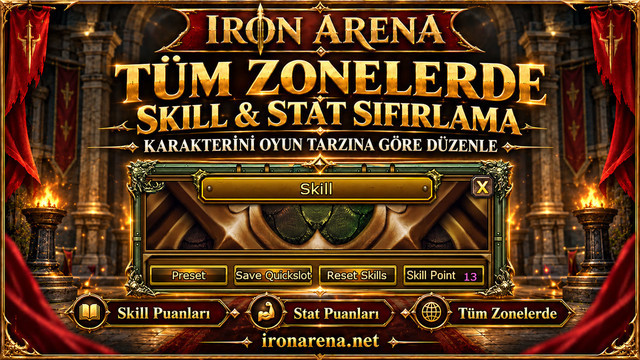
03 — Skill & Stat Reset in All Zones
Rebuild your character wherever you are!
In Iron Arena you can reset your skill and stat points in every zone. There's no need to travel to another zone to change your character's build.
Redistribute your points according to your equipment, role and preferred playstyle. Try different skill setups and shape your character your way.
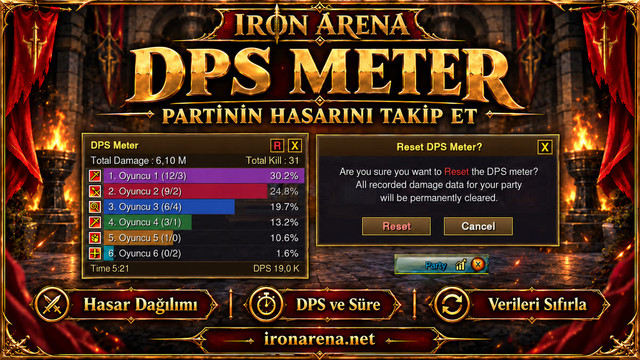
04 — DPS Meter
Track your party's damage breakdown in numbers!
The DPS Meter shows damage per player, total damage, DPS and measurement duration. Review your party's damage table, track your own contribution and compare results while testing different skill setups.
When you want to clear saved measurements, the reset is completed through a confirmation window, so you can start a new measurement from scratch.
05 — In-Game Event Calendar
Be ready for the next event!
Click the hourglass icon in the top-right corner of the game screen to open the Event List. Follow events, their start times and the on-screen countdown to plan your play.
The event list includes Border Defense War, Forgotten Temple, Chaos Dungeon, Juraid Mountain and Castle Siege War. You can switch between days and browse every event with the View All Events button.
You can also find the current schedule on the Events page of our website. Times on the web calendar are shown in GMT+3.
The image shows the event interface. Check the times on the current calendar when planning to join.
06 — Slave Merchant
Two separate markets, one management panel!
With Slave Merchant you can manage two separate markets in Moradon from a single panel. Check the items you've prepared for sale, set their prices and follow the status of both markets on the same screen.
Price your items in Noah or Knight Cash.
View the items listed in both markets from the same panel.
Review your sales activity in the Recent Sales section.
Check your sales vault and collect your earnings with the Parayı Al (Collect Money) button.
07 — Power Up Store & Web Market
Browse what you need and get ready!
In the in-game Power Up Store you can browse product categories, use the search field and view your selected products in the shopping cart.
Web Market offers in-game PUS products at the same prices and in the same currency. Products bought on the web are delivered to the mailbox of the character you choose. The characters on your account must be offline while you shop on the web.
Check the store screen for current products and prices before making your choice.
08 — Rank Statues Updated!
A new look worthy of the top!
Iron Arena's rank statues have been renewed! Gold, silver and bronze designs for ranks I, II and III take their place in the game world with light effects and majestic pedestals.
See the renewed rank statues up close and feel the thrill of competition. Claim your place at the top!
09 — Karus & Human King Thrones in Moradon
Two nations, two magnificent thrones!
The Karus King's Throne and the Human King's Throne stand in Moradon. Each nation's throne area completes the city's atmosphere with its own unique design.
When you pass through Moradon, take a closer look at the royal thrones. Choose your side and stand with your nation!
10 — Auto Reconnect

If your game connection drops, the automatic reconnect system kicks in and tries to restore the connection.
11 — Official Guide & Rankings
Research your gear, set your goals, follow the rankings!

With the item database and reverse drop search in our web guide, you can find out where the items you're after come from. Upgrade Rates, Fragment & Gem and Mining & Fishing are all available on the same page.
Follow NP, monthly NP, level and clan rankings on the website. The rankings page refreshes every minute.
» Guide and drop info | » Player and clan rankings
Take your place in Iron Arena!
Track your daily quests, set up your Genie, build your character and get ready for events. Manage your market, team up with your clan and join the fight in Iron Arena!
Create your account at ironarena.net.
Download the game files from the Download page, complete the installation and start the game with the launcher. The launcher downloads updates automatically.
Choose Karus or El Morad and begin your adventure.